%20(1).avif)



If your website runs on vulnerable PHP, the immediate fix is to apply the appropriate security update through your hosting provider or developer. The longer-term decision is whether your business still needs to maintain a PHP-based website at all.
For a marketing website that mainly explains your services, publishes content and generates enquiries, moving from WordPress to Webflow can remove the need to maintain your own WordPress installation and PHP runtime.
That decision should follow the emergency patch. A migration takes planning, and an exposed website needs attention now.
What happened with the October 2026 PHP vulnerabilities
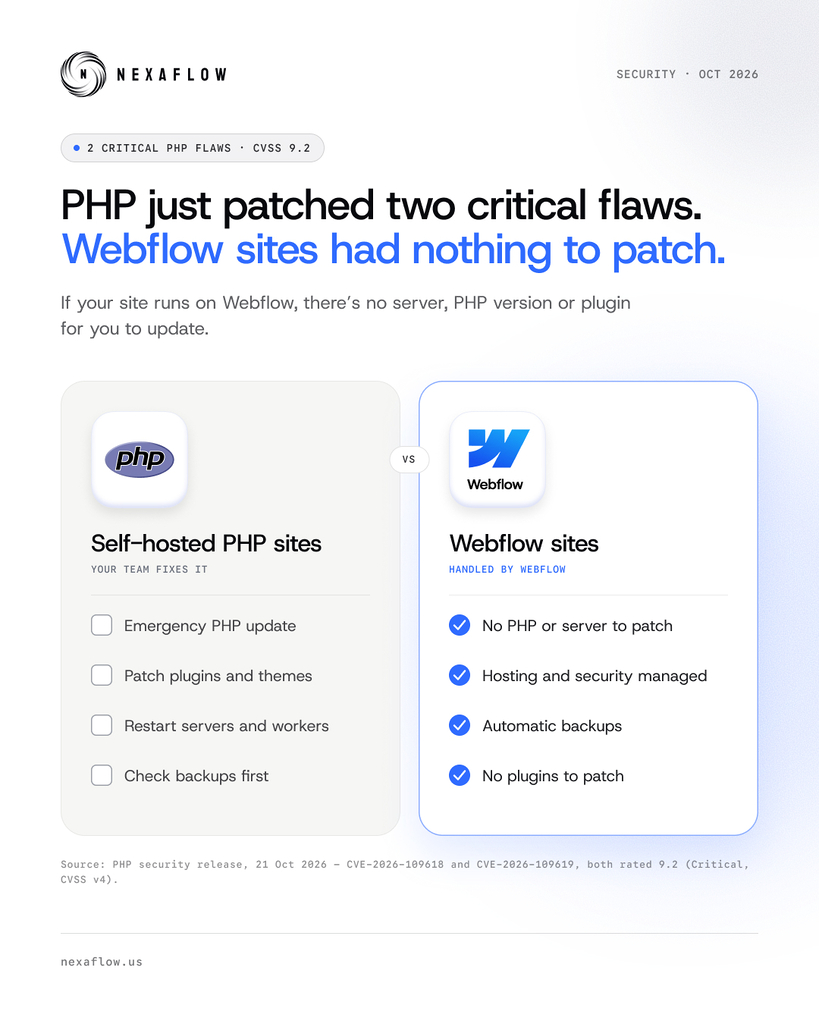
On 21 October 2026, the PHP team released emergency updates for two critical vulnerabilities, CVE-2026-109618 and CVE-2026-109619. Both can allow attackers to run code on vulnerable servers without logging in.
These are flaws in PHP itself. They are not limited to WordPress, and updating a WordPress plugin does not fix the underlying runtime.
The official PHP security advisory identifies the fixed releases as:
These are the fixes announced for this incident, rather than a permanent list of recommended versions. Your provider should use a currently supported, patched release or confirm that its vendor package contains the equivalent security fixes.
How to fix PHP vulnerabilities on your website now
Start with the company hosting your website. Ask it to confirm which PHP version serves your live site and whether the relevant security fixes have been applied.
A useful message is:
Please confirm that the PHP runtime serving our live website has been patched for CVE-2026-109618 and CVE-2026-109619. Please also check any staging sites, subdomains and other PHP applications on our account, and confirm whether any further action is required from us.
Then work through these steps:
- Check every PHP environment. Include the main site, older installations, staging sites and services that still run separately.
- Apply and verify the fix. Have your provider or developer update the affected runtime and ensure the serving processes use the patched version.
- Test important functions. Check forms, logins, search and any payment or booking flows after the update.
- Investigate signs of compromise. Unexpected administrator accounts, altered pages or unfamiliar files need investigation. Patching a vulnerability does not remove an intrusion that has already happened.
If the provider cannot patch an exposed system promptly, discuss temporarily restricting public access. CERT-EU recommends considering isolation until the fix is applied and verified.
Do not wait for a redesign or migration to deal with the current exposure.
Why a PHP update is not a permanent solution
A security update addresses the vulnerabilities it was written to fix. It does not end the need to maintain the software.
If your website continues to rely on PHP, someone still needs to track new advisories, install future patches, keep the runtime supported and check compatibility.
WordPress adds its own maintenance requirements for the core software, themes and plugins. Its security guidance recommends keeping software updated, removing unused plugins and maintaining backups.
For a business owner, the question is whether there is a clear owner for that work, and whether the website's functionality justifies keeping that setup.
Your long-term options for reducing PHP maintenance
Keep WordPress with clearly managed maintenance
A properly maintained WordPress website can remain a sensible choice, particularly if your business depends on specific plugins or custom functionality.
Managed hosting may already cover PHP security patches. Check the actual service agreement: who monitors security announcements, who applies urgent updates, who tests the website and who handles a failure?
You also need an agreed process for WordPress, theme and plugin updates, backups and recovery. Paying for hosting alone does not tell you which of those responsibilities are covered.
Move a suitable marketing website to Webflow
If your website mainly contains service pages, landing pages, articles and enquiry forms, assess whether those needs can be rebuilt in Webflow.
When that rebuild replaces your WordPress installation and you host the site with Webflow, your team no longer maintains that site's WordPress core, themes, plugins or PHP runtime.
Webflow states that it manages platform security updates and infrastructure protection. See its security documentation.
Our recommendation for a suitable marketing site is to move to Webflow when the benefit of keeping WordPress no longer outweighs its maintenance requirements.
How moving to Webflow changes the work your team owns
The practical benefit is fewer separate pieces of website software for your business to maintain.
This comparison assumes the relevant WordPress functionality has been replaced, rather than kept running behind the new site.
Webflow's site and page custom code supports HTML, CSS and JavaScript, rather than running your existing PHP application. PHP-dependent features therefore need to be replaced or served by a separately maintained backend. See Webflow's custom code documentation.
That makes the initial functionality review important. A service website and a custom application can have very different migration needs.
What you still need to maintain after moving to Webflow
Moving platforms changes your responsibilities. Your team still needs to protect accounts, limit access and review the external tools connected to the website.
Use two-factor authentication, remove access when people leave and keep a clear owner for your domain, DNS and connected services.
Custom scripts and third-party integrations also need attention. Webflow's support policy explicitly places their implementation and maintenance with the customer.
The goal is a smaller, more manageable setup. No website platform can promise that a business will never face another security issue.
Do not leave the old PHP website exposed
A new Webflow homepage does not retire the systems behind it.
An old WordPress installation might still be reachable through a subdomain, a hosting URL or an API. It may also continue serving content or powering a feature that the new site depends on.
Before closing the migration, identify every remaining PHP service. Keep required systems patched and assign someone to maintain them. Retire unused systems after confirming that their data and functionality have been safely transferred.
For example, moving your service pages to Webflow while retaining a WordPress-powered resource library reduces maintenance for the migrated pages. The resource library still needs PHP and WordPress security updates.
A change of DNS alone does not prove the old installation is inaccessible.
How to plan a WordPress to Webflow migration
Treat the move as a website project with a defined scope and launch process:
- Audit the existing website. Record its pages, content, plugins, forms, integrations and custom features.
- Decide what to replace or retain. Confirm how each required feature will work and who will maintain any remaining backend.
- Map the URLs. Preserve useful URLs where practical and prepare relevant permanent redirects for those that change.
- Rebuild and test. Check content, mobile layouts, accessibility, forms, tracking and integrations.
- Check search settings. Review metadata, canonical URLs, indexability, internal links and the sitemap.
- Launch and monitor. Verify routing, redirects, enquiries and analytics, then retire unused systems once dependencies have been checked.
Include the ongoing cost of each option in the decision. Compare hosting, support, plugin subscriptions and maintenance time alongside the one-off migration cost.
More than 75 WordPress to Webflow migrations in 2026
So far in 2026, we’ve migrated more than 75 websites from WordPress to Webflow. Examples include:
- Pro DBA, a UK market leader in database management and support.
- Ascension Marketing.
- HATHR AI.
Discuss moving your website to Webflow
If recurring updates are taking time away from improving your website, start by checking whether you still need the setup you are maintaining.
At NexaFlow, we can review your WordPress website, identify the functionality that needs to move and scope a Webflow rebuild with content, integrations and SEO migration requirements included.
You will have a clearer view of what can be retired, what needs rebuilding and what will still need maintenance.